public area: 1

Redux BG and Character, Replace Background

5.0

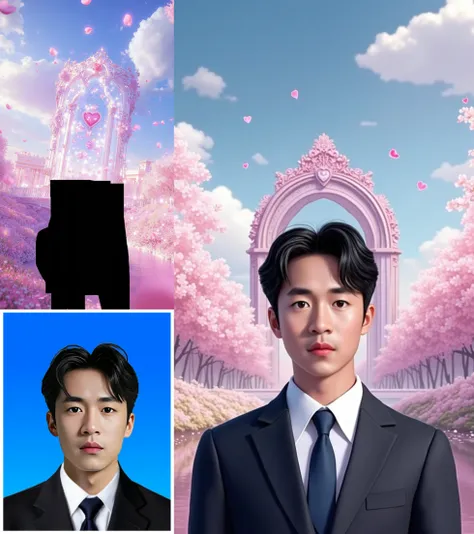
### Redux Background and Character Replacement Process### I. Workflow Process Description:1. Extract the Character: the character from the original background.2. Position the Character: Place the extracted character proportionally onto the designated masked area. Next, perform depth redrawing on the pre-composited image: 3. Load the Flux Depth Model: Access the model necessary for depth processing. 4. Extract the Depth Map: Create and consolidate the depth map of the composited image for redrawing. 5. Generate the Redrawing Prompt: Derive a prompt that will guide the redrawing process. 6. Control Facial Features: Adjust the character's facial features using Pulid. 7. Apply Redux to the Background: Integrate Redux effects on the background. 8. Apply Redux to the Character: Apply Redux effects to the character. 9. Sample and Generate Final Image: Produce the final image based on the adjustments made.### II. Usage Instructions:1. Upload Character Image: Ensure the character image is clear and complete, particularly focusing on a large facial region.2. Upload Background Image: Add the desired background in the designated area.3. Paint a Mask on the Background: Simply paint a mask up and down; the left and right areas will adjust automatically.### III. Parameter Adjustment Instructions:1. Adjust Facial Similarity: Change the weight of Pulid to modify the similarity of the character's face.2. Adjust Background Similarity: Alter the `downsampling_factor` in the Redux background area; a value of 1 represents the strongest and most similar effect, while a value of 3 indicates the weakest effect with the greatest change.3. Adjust Other Character Areas: Modify the `downsampling_factor` in the Redux character area similarly; again, a setting of 1 is the strongest and most similar, while 3 is the weakest.

TenoTony Official
funny meems

--

// Java program to create a simple console-based application// This program demonstrates basic user interaction and functionalityimport java.util.Scanner;public class FunnyMemesApp { public static void main(String[] args) { Scanner scanner = new Scanner(System.in); boolean running = true; System.out.println("\nWelcome to the Funny Memes App!"); System.out.println("Your daily dose of humor awaits.\n"); while (running) { System.out.println("What would you like to do?\n"); System.out.println("1. View a random meme"); System.out.println("2. Add your own meme"); System.out.println("3. Exit\n"); System.out.print("Enter your choice (1/2/3): "); int choice = scanner.nextInt(); scanner.nextLine(); // Consume newline character switch (choice) { case 1: displayRandomMeme(); break; case 2: System.out.print("Enter your funny meme text: "); String meme = scanner.nextLine(); addMeme(meme); break; case 3: System.out.println("Thank you for using the Funny Memes App. Goodbye!"); running = false; break; default: System.out.println("Invalid choice. Please try again.\n"); } } scanner.close(); } private static void displayRandomMeme() { String[] memes = { "Why don't skeletons fight each other? They don't have the guts!", "I told my wife she should embrace her mistakes. She gave me a hug.", "Why don’t scientists trust atoms? Because they make up everything!", "I’m reading a book on anti-gravity. It’s impossible to put down!" }; int randomIndex = (int) (Math.random() * memes.length); System.out.println("\nHere's your random meme: \n" + memes[randomIndex] + "\n"); } private static void addMeme(String meme) { // For now, we'll just acknowledge the meme // In a real application, you might save this to a database or file System.out.println("\nThank you! Your meme has been added: \n" + meme + "\n"); }}
Muhammad Jawad
Nessun risultato di ricerca